
Compare Square vs Clover
Which POS System Wins for Your Business?
When comparing POS Systems for small businesses two names come up in any conversation: Square and Clover. Both serve hundreds of thousands of merchants across North America and are genuinely capable at what they do. The problem is that most comparisons treat them as interchangeable options with slightly different price tags. They’re not.
These are two fundamentally different products built around different philosophies, and
choosing the wrong onemay cost you more than money
This Comparison
This comparison breaks down hardware costs, processing fees, feature depth by business type, integrations, and support quality in plain terms. No fluff, no filler. By the end, you’ll have a clear answer for your specific situation. Canadian merchants in particular need to pay attention to one detail most U.S.-focused comparisons skip entirely: for Clover especially, the provider you go through, like Canada First, shapes your pricing, your contract, and your support experience as much as the hardware itself does.
Square vs Clover: Hardware Options and What You Actually Get
Square’s lineup is modular and accessible. The Reader (around $49, $59) handles tap, chip, and swipe, and pairs with your phone or tablet. The Stand ($149, $199) turns an iPad into a countertop terminal. The Terminal ($299, $329) is a self-contained portable device with a built-in receipt printer. The Register ($799, $1,799) is Square’s all-in-one flagship with a customer-facing display. You can start for under $60 and scale up, and nothing locks you into a long-term commitment just to buy the hardware.
Clover’s Device Range Includes:
- Clover Flex — A versatile handheld device with a built-in printer, camera, and barcode scanner ($995). You can rent or buy outright.
- Clover Flex Pocket — A lightweight POS to take payments on the move. ($895). You can rent or buy outright.
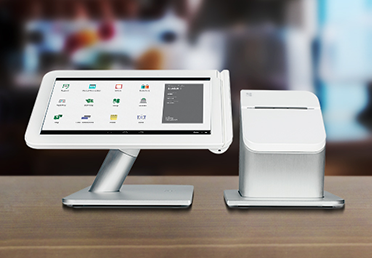
- Clover Mini — A compact countertop solution with a responsive touchscreen — perfect for tight spaces ($995). You can rent or buy outright.
- Clover Station Solo — A powerful, full-featured POS station ideal for retail and food service ($1099) . You can buy outright or pay in 12 monthly installments with no interest.
- Clover Station Duo — Features a dedicated customer-facing display, elevating the checkout experience for both staff and customers ($1995). You can buy outright or pay in 12 monthly installments with no interest.
- Clover Kiosk– is a self-service, 24-inch touchscreen ordering system designed for restaurants to reduce wait times and increase order volume. It syncs directly with Clover Point-of-Sale (POS) systems, allowing customers to browse menus, customize items, and make contactless or card payments, with orders sent directly to the kitchen ($3599). You can buy outright or pay in 12 monthly installments with no interest.
The Critical Difference is How You Buy Your POS.
Square hardware ships directly to you, no middleman. Clover is sold exclusively through resellers, like Canada First, and processors, which means your price, your contract terms, and your ongoing support all depend on who you work with. For a low-volume pop-up or a first-time merchant, Square’s accessibility wins. For a full retail floor or a busy restaurant counter, Clover’s dedicated hardware holds up significantly better over time.
Clover's dedicated hardware holds up significantly better over time.
Pricing Breakdown: The Real Cost of Square vs Clover
When analyzing the actual cost of your credit card processing, it’s important to consider the three main components of the fees you pay. There are: Software; Hardware and Transaction Fees. What may look like a great deal on one pricing component, may be wiped out by large fees buried. in the pricing of anoother component.
Square Software and Processing Fees
Square uses a three-tier software model: Free at $0/month, Plus at $49/month per location, and Premium at $149/month per location. In-person processing fees run 2.6% + $0.15 on the Free plan and drop to 2.5% + $0.15 on Plus. Online transactions on the Free plan increased to 3.3% + $0.30 in January 2026, up from the previous 2.9% + $0.30 (see Square price increase in 2026). Keyed-in transactions cost 3.5% + $0.15 across all plans. No long-term contracts, no cancellation fees.
Clover Costs and Software Tiers
Clover's hardware and software offer greater flexibility and choice.
Clover
Transaction pricing is typically complex and be intimidating. At Canada First we make it simple and clear. So clear that you will understand how you’ll be saving money when working with Canada First
Clover’s software plans range from $0/month for a basic payments plan up to $89.95/month for advanced retail or restaurant tiers.
Clover’s App market offers 100’s of additional apps to integrate with your account. For example, you can easily download your busiiness statements to Quickbooks.
Here’s how we make it both simple and save you the most money. Transaction fees are cost plus 0.20% and four cents a transaction.
(Not too long ago Visa and MC reported to Parliament that their average cost was 1.4% in Canada for all their credit cards. So we add 0.2% and 4 cents to that). That’s how simple your processing fees with Canada-First will be.
That means with Clover for the average credit card transaction you should expect to payabout 1.6% and 4 cents - compared to 2.6% and 15 cents with Square.
Moreover there is NO early termination fee.
Why would you quit unless you had to? We price match any comprehensive written offer you ever get.
A Concrete Point-of-Sale Comparison
Here’s what the numbers look like in practice. Take a small retailer processing $15,000/month in card sales, assuming an average transaction size of $50, that’s roughly 300 transactions per month.
On Square’s Plus plan at 2.5% + $0.15 per transaction, the processing cost breaks down as $375 in percentage-based fees plus $45 in per-transaction fees, totalling $420/month in processing, plus the $49 software fee, for a combined monthly outlay of approximately $469 before hardware is considered.
Clover’s overall average transaction cost is (1.6% times $15,000 = $240) plus (4 cents times 300 = $12).
That’s a savings off $2,500 a year!
Clover hardware may be a little more expensive but it is a one time outlay. The rest of the time you save more and you get more.
Features by Business Type: Retail, Restaurants, and Services
For restaurants, Square includes built-in online ordering at no extra cost, unified dashboard reporting, and tip management out of the box. This makes it a strong fit for cafes, food trucks, and quick-service operations that want everything working from day one without configuring third-party apps.
Clover handles tipping well and offers flexible handheld options via the Clover Flex vs Square Terminal comparison that often favours Clover in high-traffic environments, but it relies on app additions for online ordering and deeper table management.
For quick-service, both platforms work.
For full-service dining with complex table flows, the Clover Station Duo is your best bet for a dedicated restaurant POS.
For full service dining with complex table flows, the Clover Station Duo is your best bet for a dedicated restaurant POS.
Restaurants
For restaurants, Square includes built-in online ordering at no extra cost, unified dashboard reporting, and tip management out of the box. This makes it a strong fit for cafes, food trucks, and quick-service operations that want everything working from day one without configuring third-party apps.
Clover handles tipping well and offers flexible handheld options via the Clover Flex vs Square Terminal comparison that often
favours Clover in high-traffic environments but it relies on app additions for online ordering and deeper table management.
For full-service dining with complex table flows, only the Clover Station Duo is a dedicated restaurant POS.
Retail
For retail businesses Clover's hardware has a real edge.
The built-in barcode scanner on the Flex speeds up checkout in ways that a tablet-based Square setup doesn’t replicate as cleanly. Both platforms support multi-location management, but only on paid tiers. Square’s free plan covers basic inventory and barcode scanning, and the Plus and Premium plans add meaningful multi-location reporting. Clover scales well for more complex retail configurations with the right app setup.
Service Businesses
For service businesses, at first look it may appear that Square has a built-in advantage. Appointments, invoicing, and customer management are native Square features that work without downloading anything extra. Consultants, salons, tradespeople, and freelancers can run their whole client-billing workflow inside Square from day one. Of course all of these “standard” inclusions are reflected in Square’s significantly higher base pricing. Additionally, choosing Square may result in you paying a significantly higher price for apps and features that you don’t need, want or use.
Clover’s core app setup also handles all types of service businesses, but may require app additions to match what Square includes by default. The good news is that Clover offers an array of app packages so you can build an app setup that gives you exactly what you need and no more. The benefit of this is twofold. The first is that your processing system isn’t cluttered with a lot of apps that you don’t want or use, and the second is that you get a significant cost savings by only paying for the apps you actually use to run your business.
Software Ecosystems and Third-Party Integrations
Square’s integration library covers the tools most small businesses actually use. eCommerce connections include WooCommerce, Shopify, and Ecwid. Accounting integrations cover QuickBooks Online and Xero. Delivery and pickup connect to DoorDash, Uber Eats, and Grubhub. Marketing ties into Mailchimp and ActiveCampaign. ShipStation handles fulfillment. Zapier opens the door to thousands of additional tools for businesses with custom workflows. Many of these integrations have free tiers, and the Square dashboard ties everything together without requiring a technical setup.
Clover’s App Market offers hundreds of apps across accounting, loyalty programs, employee scheduling, delivery, and vertical-specific tools. The depth of customization is a genuine strength, particularly for established businesses with specific operational needs. The tradeoff is that app costs stack on top of your monthly software fee, and the quality and availability of apps can vary depending on your plan and provider. What’s accessible at one plan tier may require an upgrade at another. For an official look at available third-party tools, consult the Clover App Market.
In this part of the point-of-sale comparison, Square wins on out-of-the-box eCommerce connectivity and immediate usability for businesses that sell online.
Clover wins on hardware-level customization and vertical depth for businesses willing to actively configure their setup.
Customer Support and System Reliability
Square offers phone, email, and chat support on weekdays from 6am to 6pm Pacific time. Recent user feedback in 2026 consistently notes slow ticket resolution and limited transparency when disputes arise. The more significant concern is structural: Square operates as a payment facilitator, which means your merchant account sits inside a pooled master account rather than being individually underwritten. This gives Square’s automated systems broad authority to hold funds or freeze accounts when transaction patterns trigger fraud flags, sometimes without warning, with holds lasting up to 90 days. For newer businesses or those with variable monthly volumes, this is a real risk to factor in.
This gives Square's automated systems broad authority tohold funds or freeze accounts when transaction patterns trigger fraud flags, sometimes without warning, with holds lasting up to 90 days.
For newer businesses or those with variable monthly volumes, this is a real risk to factor in.
Clover offers 24/7 phone support with live chat response times under 20 minutes in most current reviews. The caveat is that support quality depends heavily on your reseller. A large national bank processing Clover accounts may route you through a generic call center.
A dedicated Canadian merchant services provider like Canada Firstwho knows your account gives you a very different, and cost saving experience.
Both systems maintain strong uptime with reliable offline modes. Square’s offline capability is consistent across its full hardware range. Clover’s offline mode varies slightly by device. For both platforms, the real reliability factor is your internet connection, not the hardware itself.
Which System Fits Your Business?
Square is the right choice for new businesses with low to moderate volume, service businesses that need appointments and invoicing built in, food trucks and pop-ups, and anyone who needs zero contract risk. The free tier is genuinely functional, not a stripped-down bait-and-switch. Hardware is affordable to start, and you can walk away any time without a penalty.
Clover fits established retailers, higher-volume restaurants, and businesses that need durable countertop hardware with a customized feature stack.
At volume, Clover's processing rates beat Square's flat rate when you choose cost-plus pricing.
The hardware performs well in demanding environments, and the app ecosystem gives growing businesses room to build out operational tools over time..
What most comparisons skip entirely is this: Clover’s value depends heavily on who sells it to you. A Canadian business, like Canada First, that sources Clover terminals through a dedicated local provider can access transparent cost-plus pricing, where the interchange rate and the processor margin appear as separate line items on every statement, along with a dedicated account manager who knows your account and local support that doesn’t route through a U.S. queue. That combination can make Clover into a long-term asset that gets more cost-efficient as your volume grows. Canada First is built around exactly that model, and it’s worth asking any Clover reseller you speak with whether their pricing and support structure matches those standards.
The Bottom Line: Square vs Clover for Your Business
Ultimately, the Square vs Clover decision comes down to where your business is today and where it’s going. Square is built for simplicity, low commitment, and businesses still finding their footing on volume and workflow. However, the price you pay for your processing is only reasonable at low transactioin volumes.
Clover is built for established operations that want durable hardware, deeper feature customization, and processing rates that scale favorably as the business grows. Neither is universally better, the right answer is specific to your situation..
For Canadian merchants leaning toward choosing Clover, the provider decision is a primary consideration. Transparent cost-plus pricing, a real account manager, and contract terms that don’t bury penalties in fine print can make a big difference to your total cost of having a merchant account.
If you’re ready to see what a Clover credit card processing set up would actually cost you through a Canadian provider such as Canada First, reach out to us. We’ll provide you with a quote built around merchant education and honest pricing. We’ll walk you through real numbers for your specific business, processing volume, transaction mix, and hardware needs, so you can make this your decision with full information rather than just a sales pitch.
At Canada First we believe that
The more you know the better we look
Ready to Explore Clover for Your Canadian Business?
Canada-First will give you expert guidance, side by side comparisons, and personalized recommendations to help you find the perfect payment solution

Let Us Help
Get in touch and ask us for a quote or ask a question about what solution is best for your business. Call us at 888-616-6967 or click to send an email. We’re here to help.